
A Transportation Management System (TMS) is software used to plan, execute, monitor, document, and analyze the movement of freight. Depending on who uses it, a TMS may manage carrier selection, routes, loads, drivers, vehicles, freight documents, billing, compliance, settlements, and reporting. The important point is that TMS is not one specific type of application. A shipper, freight broker, 3PL, and trucking carrier may all use a TMS, but they need very different workflows from it.
What is a Transportation Management System?

A Transportation Management System, usually shortened to TMS, is a software platform used to manage transportation operations and the movement of goods.
The terms Transportation Management System, Transportation Management Software, TMS software, and transportation management platform are often used to describe the same general category of software.
At the broad supply-chain level, a TMS can help a company plan transportation, select carriers or transportation modes, organize shipments, monitor freight movement, manage documentation, calculate transportation costs, and analyze performance.
For a trucking carrier, the same software category has a different operational focus. The system usually centers on loads, dispatch, drivers, trucks and trailers, documents, invoicing, settlements, expenses, compliance information, and reporting.
This distinction is important because there is no single feature list that defines every TMS.
Transportation Management Systems serve different types of businesses
| Type of TMS user | Typical TMS focus |
|---|---|
| Shipper or manufacturer | Carrier selection, freight rates, route and mode planning, tendering, shipment visibility, freight audit, and delivery performance |
| Trucking carrier | Loads, dispatch, drivers, fleet, documents, expenses, invoicing, settlements, compliance, and operational reporting |
| Freight broker or 3PL | Customer freight, carrier sourcing, carrier compliance, rates, margins, tracking, documentation, and billing |
| Large multimodal organization | Network planning across truck, rail, ocean, or air transportation together with ERP, WMS, and other supply-chain systems |
Trucking365 TMS belongs primarily to the carrier TMS category. It is designed around trucking operations rather than enterprise shipper procurement or global multimodal freight planning.
We cover the needs of multi-truck carriers in more detail in our TMS Software for Carriers guide and the single-truck operating model separately in our TMS for Owner Operators guide.
How does a Transportation Management System work?
The easiest way to understand a TMS is to look at what happens to transportation information from the moment freight is planned until the financial and operational work is complete.
Different TMS platforms implement this differently, but most transportation workflows can be divided into five stages: plan, execute, monitor, settle, and analyze.
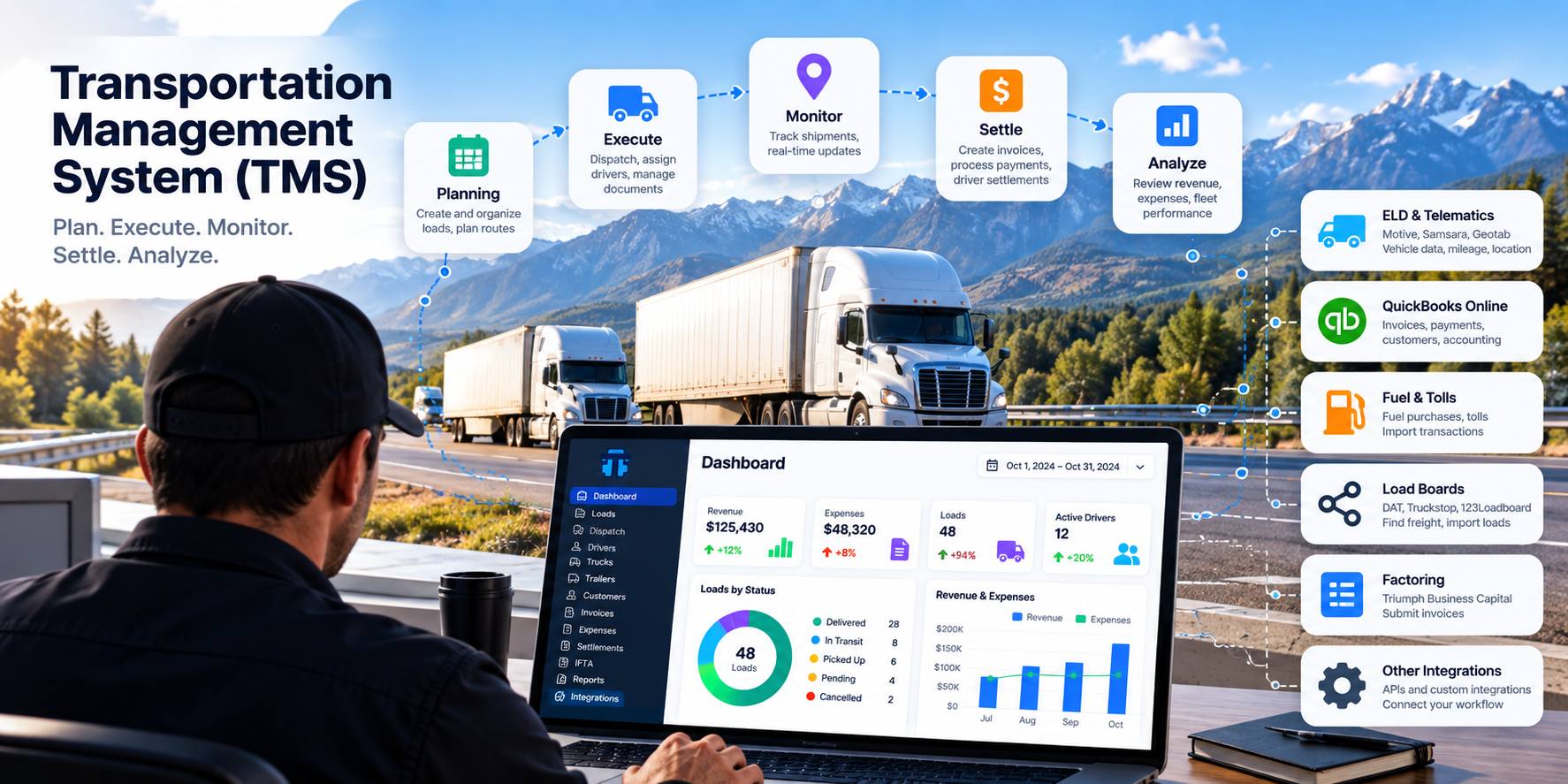
1. Plan transportation
Planning determines how freight is going to move.
In a shipper TMS, planning may include comparing transportation modes, selecting carriers, calculating freight rates, building loads, choosing routes, and optimizing capacity.
In a carrier TMS, planning is usually closer to the physical operation of the fleet: creating the load, organizing pickup and delivery information, assigning a truck, trailer, and driver, and planning the trip.
2. Execute the transportation plan
Once the plan exists, the TMS becomes the operational record for the shipment.
Dispatchers, drivers, operations staff, customers, brokers, and accounting may all need different parts of the same information.
A well-designed TMS avoids creating a separate copy of the shipment for each department.
3. Monitor freight movement
Transportation rarely follows the original plan perfectly.
Pickup appointments change, traffic creates delays, drivers communicate updates, documents arrive, trucks change location, and customers ask for shipment status.
A TMS can combine manual status updates, mobile-app information, GPS data, telematics, or ELD integrations to provide operational visibility.
4. Complete documents and financial workflows
Transportation does not end when the truck reaches the delivery location.
The delivery may still require a POD, invoice, carrier payment, driver settlement, factoring submission, expense allocation, fuel information, or accounting synchronization.
The TMS can use information already collected during transportation instead of requiring the back office to create the same information again.
5. Analyze transportation performance
The final stage is turning transportation records into useful information.
Reports can help management understand revenue, transportation costs, fleet utilization, driver workload, unpaid invoices, expenses, fuel, maintenance, and other operating metrics.
The more consistently information is collected during normal operations, the more useful those reports become.
Where does a TMS fit in the supply chain?
A Transportation Management System is usually one part of a larger software environment.
Problems often appear when companies expect one application to replace every specialized system they use.
A better way to understand TMS is to define which part of the operation each system owns.
| System | Main responsibility |
|---|---|
| TMS | Transportation planning, execution, loads, freight movement, visibility, transportation documents, billing, and related operational workflows |
| WMS | Warehouse inventory, receiving, storage, picking, packing, and fulfillment |
| ERP | Company-wide financial, purchasing, accounting, order, and business-management processes |
| ELD | Driver records of duty status and Hours of Service data together with supported vehicle or telematics information |
| Load board | A marketplace where freight and available transportation capacity can be matched |
| Accounting software | General bookkeeping, financial accounting, bank reconciliation, and company financial records |
| Factoring company | Provides invoice financing under an agreement with the transportation company |
The systems can exchange information without becoming the same product.
For example, QuickBooks Online can remain the company's accounting system while a TMS remains the source of trucking-specific load and invoice information.
An ELD can continue recording HOS information while the TMS uses supported location or mileage data for dispatch visibility and reporting.
A load board can help find freight while the TMS manages what happens after the load is booked.
Core Transportation Management System features
There is no universal TMS feature list because shipper, broker, carrier, and enterprise transportation systems solve different problems.
However, several capabilities appear repeatedly across modern transportation management software.
Load and shipment management
The TMS should maintain a structured record of the freight being transported.
This can include customers, reference numbers, rates, pickup and delivery locations, appointments, equipment, transportation status, documents, and financial information.
For a carrier, the load often becomes the central entity connecting dispatch, driver activity, truck information, documents, invoices, and expenses.
Dispatch and transportation planning
Dispatch determines who or what will move the freight and when.
Carrier-focused systems may assign drivers and equipment, organize trips, and show active transportation on a dispatch board.
Enterprise and shipper TMS platforms may go further by comparing carriers, transportation modes, service levels, capacity, and route alternatives.
Route planning and route optimization
Route optimization is an important capability in many Transportation Management Systems, but its meaning depends on the product.
An enterprise TMS may automatically optimize routes across a transportation network based on distance, capacity, service requirements, rates, stops, and other constraints.
A carrier TMS may instead organize pickup and delivery locations and connect with specialized routing or navigation tools.
When evaluating TMS software, it is worth asking exactly what the vendor means by route optimization rather than assuming every TMS performs the same calculation.
Freight visibility and tracking
A TMS can help operations teams understand where a shipment is in its lifecycle and, when location data is available, where the vehicle carrying it was last reported.
Visibility data may come from drivers, a mobile application, GPS, ELD, telematics, or another connected tracking provider.
Customer-facing tracking links can also reduce the number of routine status requests sent to dispatch.
Document management
Transportation creates a large amount of paperwork.
Rate confirmations, BOLs, PODs, receipts, scale tickets, lumper receipts, carrier packets, vehicle documents, and driver documents all belong to different parts of the operation.
A TMS should make those documents part of the appropriate load, customer, driver, vehicle, invoice, or other record instead of leaving them scattered between email, phones, and file folders.
Fleet and maintenance management
Carrier-focused TMS software frequently includes truck and trailer records, maintenance information, vehicle documents, inspections, insurance, registration, and expiration dates.
Maintenance scheduling and maintenance history become more valuable as the fleet grows because equipment availability directly affects dispatch capacity.
Driver management
Carrier TMS platforms may manage driver records, CDL information, medical-card dates, driver status, documents, payment rules, assignments, and settlements.
A mobile Driver App can connect the driver to the same transportation workflow without giving the driver access to the entire back office.
ELD, HOS, DOT, and FMCSA information
A TMS and an Electronic Logging Device solve different problems.
The ELD records driving and duty-status information required under applicable Hours of Service rules. The TMS manages the wider transportation and business process.
For U.S. motor carriers, driver and fleet processes also exist within DOT and FMCSA requirements.
A TMS can help organize driver records, vehicle records, expiration dates, and supported ELD data, but using TMS software does not transfer regulatory responsibility away from the carrier.
Invoicing and freight billing
Transportation information should not have to be entered again simply because the load has reached the billing stage.
A TMS already knows the customer, shipment, rate, dates, documents, and other information required for billing.
Reusing that information can shorten the time between delivery and invoice creation.
Driver settlements and carrier payments
Carrier-focused TMS platforms may also calculate driver or owner-operator settlements.
Payment can be based on miles, percentage of gross, flat amounts, team rules, reimbursements, deductions, detention, layover, bonuses, and other company-specific rules.
This is one of the areas where carrier TMS differs significantly from a shipper-oriented transportation platform.
IFTA and fuel information
For motor carriers operating under the International Fuel Tax Agreement, jurisdiction mileage and tax-paid fuel information become another transportation data flow.
A carrier TMS can collect or import supported mileage and fuel data and use it to prepare an IFTA report.
The carrier should still review its underlying records and remains responsible for the filing.
Expenses and transportation costs
A transportation operation cannot be evaluated from gross revenue alone.
Fuel, maintenance, tolls, repairs, parking, insurance, scales, lumper charges, equipment payments, and other expenses affect the real cost of moving freight.
TMS reporting becomes more useful when expenses can be connected to the appropriate truck, driver, load, or category.
Integrations and APIs
A modern TMS should be able to exchange information with other systems where that removes real manual work.
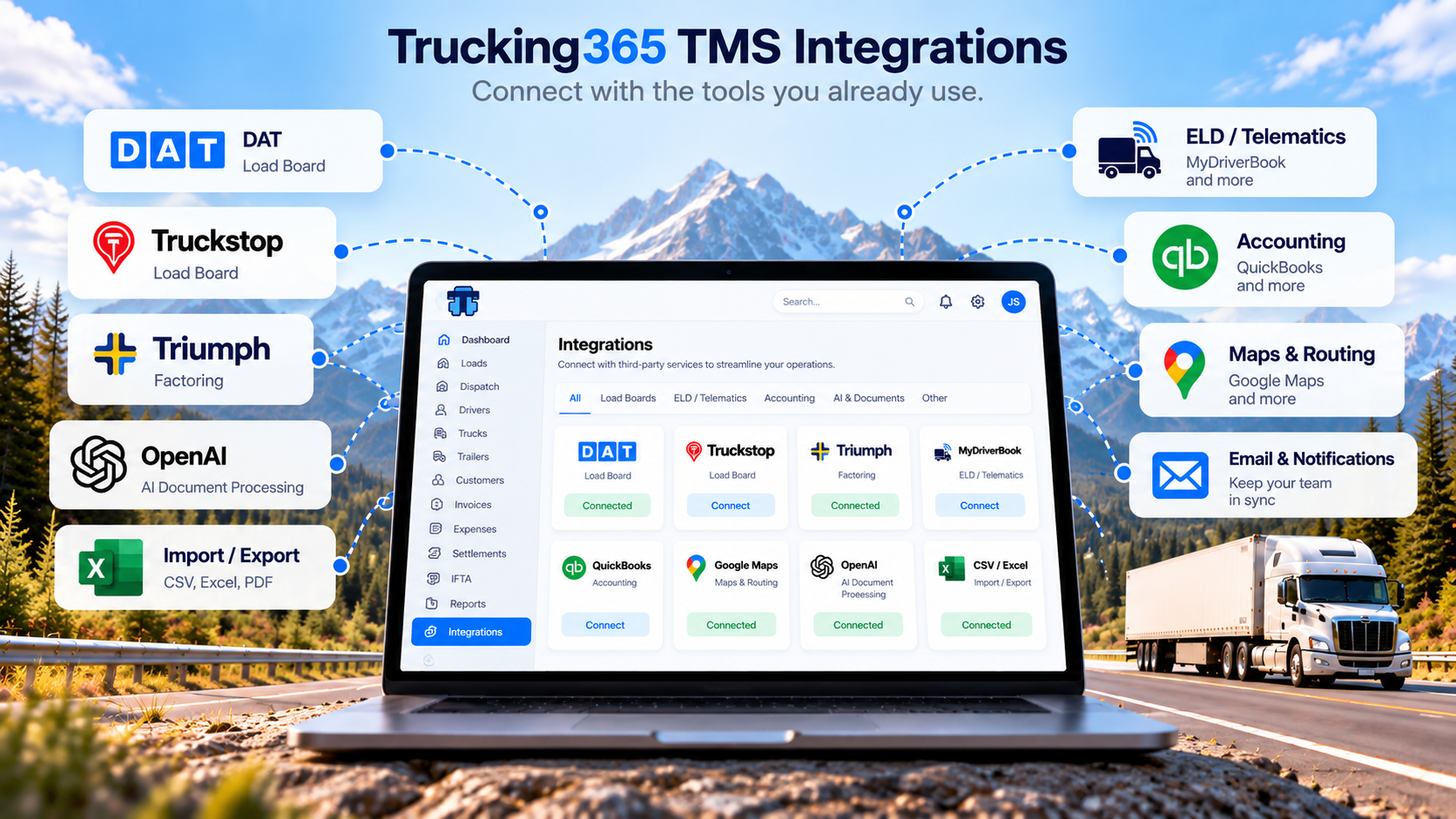
Common integration categories include ELD and telematics systems, accounting platforms, load boards, factoring companies, toll services, fuel systems, tracking services, ERP, WMS, and customer systems.
The existence of an integration alone does not say very much.
The better question is what data moves, in which direction, how frequently, and which manual process is eliminated.
Reporting and analytics
TMS reports can turn the records created during daily operations into information management can use.
Depending on the system, this may include transportation costs, profitability, load volume, fleet workload, driver workload, revenue, expenses, maintenance, fuel, unpaid invoices, service levels, or customer performance.
What are the benefits of Transportation Management Software?
The value of a TMS is not simply that transportation information exists in a database.
The system becomes useful when that information removes manual work or helps somebody make a better decision.
- Less repetitive data entry. Information entered once can be reused by dispatch, drivers, accounting, reporting, and connected systems.
- Better transportation visibility. Teams can see shipment status, vehicles, documents, invoices, or other operational information from one system.
- Faster billing. Delivery documents and load information can flow directly into invoicing instead of being recreated manually.
- Fewer missed tasks. Expiration dates, unpaid invoices, missing documents, maintenance records, and other items become easier to monitor.
- Lower administrative cost. Automation can remove work that otherwise has to be handled manually by dispatch or back-office employees.
- More consistent processes. Employees work with the same records rather than maintaining separate spreadsheets and versions of the same information.
- Better reporting. Operational and financial information can be analyzed without reconstructing the business from several unrelated systems.
- Easier growth. A company can add trucks, drivers, customers, users, and integrations without rebuilding its operating process from scratch.
A TMS cannot fix an inefficient process simply by digitizing it.
The greatest benefit comes when the software actually reduces the number of manual steps required to complete transportation work.
Cloud TMS vs on-premise and custom Transportation Management Systems
Transportation management software can be delivered in several ways.
The old distinction between buying software and building custom software is no longer sufficient because modern systems may be cloud SaaS, private-cloud, on-premise, highly configurable, or completely custom.
| Type | Typical characteristics | Main trade-off |
|---|---|---|
| Cloud SaaS TMS | Hosted by the vendor, subscription pricing, browser access, automatic updates, faster onboarding | Customization is normally limited to functionality supported by the vendor |
| On-premise TMS | Installed or hosted in infrastructure controlled by the customer | Greater infrastructure and upgrade responsibility |
| Custom TMS | Designed around the company's specific workflows and integrations | Development, maintenance, testing, security, and long-term ownership remain the company's responsibility |
Cloud TMS has made transportation management software accessible to much smaller companies because the customer no longer needs to build and maintain the complete software infrastructure.
That does not automatically make SaaS the right choice for every organization.
A very large or unusually complex transportation network may need functionality, integration architecture, or data controls that justify a custom or enterprise implementation.
Who uses Transportation Management Systems?
TMS software is used anywhere the physical movement of goods becomes important enough to manage as a structured process.
- Manufacturers managing inbound materials and outbound finished goods
- Retailers and distributors coordinating deliveries
- E-commerce businesses shipping customer orders
- Shippers managing multiple transportation providers
- Trucking carriers operating trucks, drivers, and freight
- Freight brokers arranging transportation with third-party carriers
- 3PL and logistics service providers managing transportation for customers
- Enterprise organizations coordinating multimodal transportation networks
The TMS required by each group can be very different.
This is why searching for the system with the longest feature list is usually less useful than finding the system designed around the same type of transportation operation as your company.
How should you choose a Transportation Management System?
Choosing a TMS should begin with the work your company already performs rather than with vendor feature pages.
Write down where transportation information currently originates, who uses it, where it is copied, what employees have to remember manually, and where delays usually appear.
Then use those workflows to evaluate software.
| Question | Why it matters |
|---|---|
| Which type of transportation operation is the TMS designed for? | A shipper TMS, broker TMS, and carrier TMS may all use the same name while solving different problems |
| Which repetitive steps will the system actually remove? | Features have little value when employees still have to copy the same information manually |
| Which integrations are available? | The TMS should fit the existing technology stack rather than create another data silo |
| What data moves through each integration? | An integration logo is not useful if it does not exchange the information your workflow requires |
| Can different users have different permissions? | Dispatch, accounting, management, safety, and drivers should not necessarily see or control the same information |
| Can employees use the system away from the office? | Transportation operations happen on the road as well as behind a desk |
| Can company data be exported? | Your operational records should not become trapped inside one vendor's platform |
| How long does implementation take? | A theoretically powerful system produces no value until people can actually use it |
| How responsive is support? | Transportation operations cannot stop while a software problem waits for attention |
| How does pricing change as the business grows? | User, truck, load, and integration pricing models can produce very different long-term costs |
A good TMS does not need to contain every transportation feature ever created.
It needs to solve enough of your company's actual transportation workflow to save more time and money than the system costs to implement and operate.
How Trucking365 TMS fits the Transportation Management System model
Trucking365 TMS is a cloud-based Transportation Management System designed primarily for motor carriers, dispatchers, owner operators, and trucking back-office teams.
It does not try to be an enterprise shipper platform for ocean, rail, air, and global freight procurement.
Its focus is the carrier side of transportation: managing the information and work required to move a truckload from booking through payment and reporting.
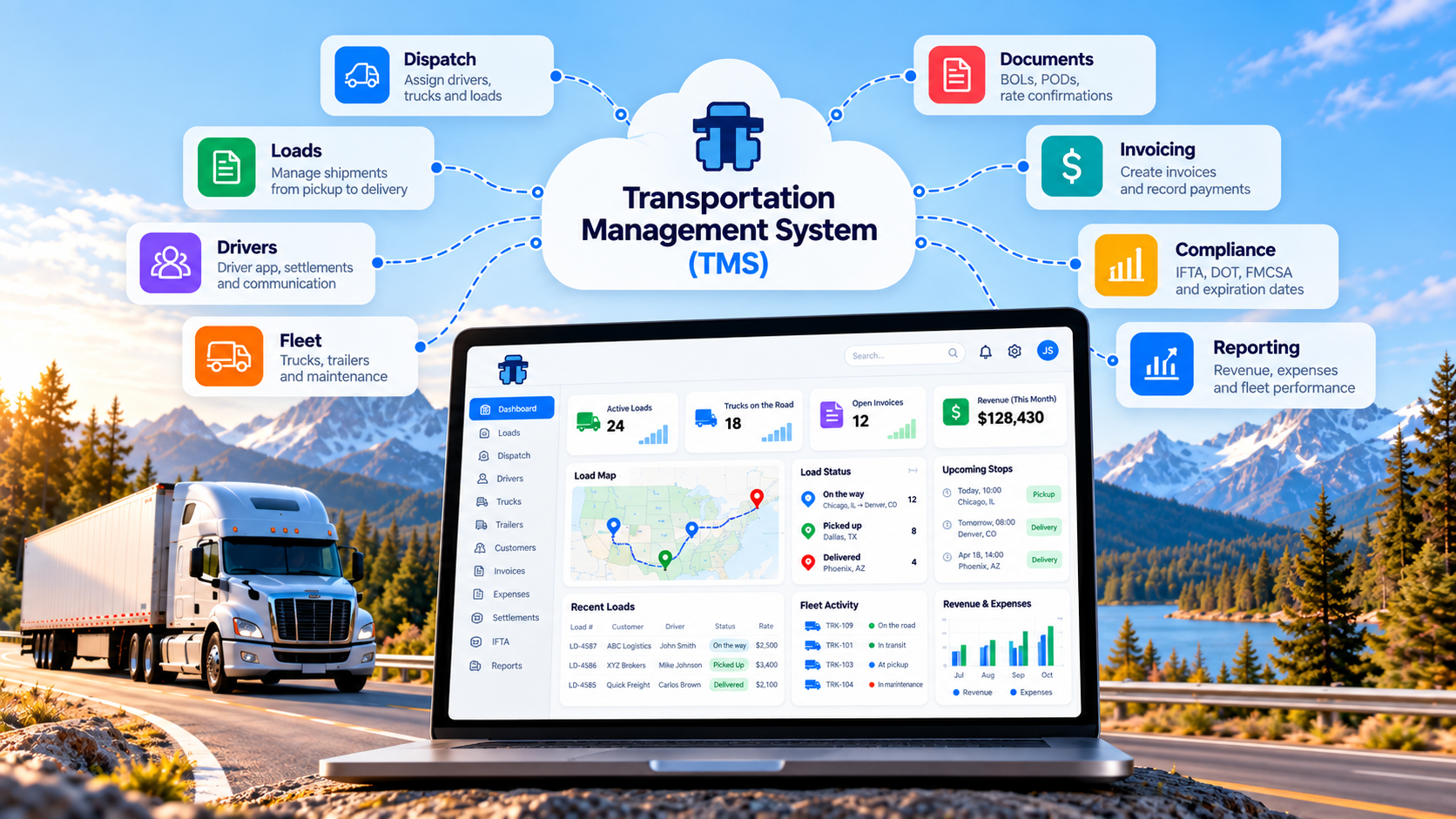
| Transportation Management capability | How Trucking365 TMS implements it |
|---|---|
| Load management | Create and manage loads through their lifecycle, including AI-assisted load creation from a rate confirmation PDF |
| Dispatch | Assign and manage drivers, trucks, trailers, trips, and active transportation through carrier dispatch workflows |
| Driver connectivity | The Trucking365 TMS Driver App provides load information, document uploads, messaging, location support, and settlement access |
| Fleet management | Manage trucks and trailers, maintenance information, documents, inspections, insurance, registration, and expiration dates |
| Document management | Store Rate Confirmations, BOLs, PODs, driver documents, vehicle documents, and other operational records with the correct entities |
| Accounting workflow | Create invoices, record payments, manage expenses, and calculate driver settlements using operational information already in the TMS |
| IFTA | Prepare quarterly IFTA reporting using mileage and tax-paid fuel information, including supported ELD mileage imports |
| ELD and telematics | Integrations with supported providers such as Motive, Samsara, and Geotab can exchange supported driver, vehicle, mileage, or location information |
| Accounting integration | QuickBooks Online integration helps synchronize supported customer, invoice, payment, attachment, and related accounting information |
| Factoring | Triumph Business Capital integration supports submitting invoices and associated freight documents through the configured factoring workflow |
| Customer visibility | Broker Tracking Links can share the latest recorded shipment location without giving the recipient access to the TMS account |
| Reporting | Revenue, expenses, workload, fuel, maintenance, expiration, and other carrier reports reuse information created during normal operations |
How my understanding of TMS changed from 2004 to today
I first entered the trucking business in 2004 as an owner operator with one truck and one trailer.
By 2007, the company had grown to three trucks and four trailers.
At that time, cloud software was not part of everyday small-carrier operations in the way it is now. There was no simple browser-based system that could connect dispatch, documents, drivers, vehicles, accounting, and reporting for a small trucking company.
Most processes were handled through a mixture of paper, phone calls, email, spreadsheets, and specialized software that solved only one part of the problem.
From 2010 through 2022, I worked professionally in web development, and my team and I built platforms and services of different levels of complexity, including software for logistics businesses.
Seeing transportation first from the carrier side and later from the software side changed the way I define a good Transportation Management System.
A TMS is not valuable because it has a large menu.
It is valuable when information entered at one stage of transportation remains useful at the next stage.
A rate confirmation should not become a second manual load entry.
A delivered load should not require somebody to recreate its information to make an invoice.
Mileage already available from an integrated system should not have to be typed again for reporting.
A POD already uploaded by the driver should not have to be requested again by accounting.
This principle has become one of the main ideas behind Trucking365 TMS: enter or collect information as close as possible to where it originates, then reuse it throughout the rest of the transportation workflow.
Customer feedback reinforces the same idea.
Most feature requests we receive are not requests for another dashboard simply because dashboards look impressive. Carriers usually ask us to remove a specific repeated action, calculation, document handoff, or synchronization problem.
One Trucking365 TMS customer described the platform as a simple, easy-to-use software for carriers and dispatchers
.
For us, that description matters because transportation software only saves time when the people responsible for dispatch, driving, accounting, safety, and management can actually use it as part of their normal work.
A TMS should connect specialized systems, not necessarily replace them
One of the easiest ways to make transportation software unnecessarily complicated is to assume the TMS must become every other system the company uses.
That is usually not necessary.
An ELD can remain responsible for supported driver and vehicle data.
QuickBooks Online can remain responsible for the company's accounting books.
A factoring company can continue providing financing.
A load board can remain the marketplace where freight is found.
A routing provider can specialize in commercial vehicle routing.
The TMS becomes the operational layer that connects the relevant information to transportation records.
The practical test for an integration is therefore not whether two logos appear next to each other on a website.
The practical test is whether employees have to enter the same information fewer times after the integration is enabled.
How much does Transportation Management Software cost?
There is no single standard price for TMS software.
Providers use different pricing models depending on the market they serve.
- Flat monthly subscription
- Price per user
- Price per truck or vehicle
- Price per shipment or load
- Tiered pricing based on fleet or company size
- Enterprise contracts with custom implementation and integration pricing
The cheapest monthly subscription is not automatically the least expensive TMS.
Implementation time, training, support, integration fees, required add-ons, and the amount of manual work that remains after implementation all affect total cost.
Trucking365 TMS uses fleet-based pricing.
- Owner: $39 per month for 1 truck and 1 user
- Startup: $79 per month for 2–7 trucks and up to 5 users
- Growing: $149 per month for 8–15 trucks with unlimited users
- Pro: $249 per month for 16–30 trucks with unlimited users
- Enterprise: custom pricing for fleets with more than 30 trucks
Current plan details are available on the Trucking365 TMS pricing page.
There are no long-term contracts, and a free trial can be started without a credit card.
The future of Transportation Management Systems
Transportation software is moving from systems that mainly record completed work toward systems that actively reduce the work required to run transportation.
AI is one part of that change, but AI alone does not make a useful TMS.
The larger change is that transportation data can now move between documents, mobile devices, ELD and telematics providers, accounting systems, customer visibility tools, and internal workflows without being manually recreated every time.
For example, Trucking365 TMS can use AI to extract structured load information from a rate confirmation PDF.
The value is not the fact that AI read a PDF.
The value is that the resulting load data can then be used by dispatch, the Driver App, documents, invoicing, settlements, and reports.
The same principle applies to automation in general.
The best automation is not automation that hides transportation decisions inside a black box. It is automation that removes predictable repetitive work while leaving the important operational information visible and auditable.
As TMS platforms evolve, integrations, mobile workflows, real-time data, APIs, deterministic business rules, and AI-assisted processes will increasingly work together rather than exist as separate features.
What is the best Transportation Management System?
There is no single Transportation Management System that is automatically best for every company.
A manufacturer managing global inbound freight has different requirements from a freight broker.
A freight broker has different requirements from a trucking carrier.
A trucking company with three trucks has different requirements from a carrier operating hundreds of power units.
The best TMS is the one designed closely enough around your type of transportation operation that it removes more work than it creates.
Before choosing one, determine which processes need to be connected, which specialized systems must remain in place, what information employees currently enter more than once, what reports management needs, and how the TMS will fit the business as it grows.
For trucking carriers, Trucking365 TMS is built around that practical carrier workflow: loads, dispatch, drivers, fleet, documents, expenses, invoicing, settlements, IFTA, integrations, and reporting in one connected system.
Frequently Asked Questions
What is a Transportation Management System?
A Transportation Management System, or TMS, is software used to plan, execute, monitor, document, and analyze the movement of freight.
Depending on the type of business using it, a TMS may manage routes, carriers, loads, dispatch, drivers, vehicles, shipment visibility, freight documents, billing, compliance, and reporting.
What does TMS software do?
TMS software connects the information and workflows required to move freight from planning through execution, delivery, financial processing, and reporting.
A shipper TMS may focus on carrier selection, rates, routes, and multimodal transportation, while a carrier TMS usually focuses on loads, dispatch, drivers, fleet, documents, invoicing, settlements, expenses, and reporting.
How does a Transportation Management System work?
A TMS generally follows the transportation lifecycle: plan the movement of freight, execute the transportation plan, monitor progress, complete documents and financial workflows, and analyze the resulting data.
The exact workflow depends on whether the system is designed for shippers, carriers, freight brokers, 3PLs, or multimodal transportation networks.
What is the difference between a TMS and a WMS?
A Transportation Management System manages the movement of freight between locations.
A Warehouse Management System manages inventory and operations inside a warehouse, including receiving, storage, picking, packing, and fulfillment.
The two systems can exchange information because warehouse activity and transportation activity are closely connected.
What is the difference between a TMS and an ERP?
A TMS focuses on transportation operations and freight movement.
An ERP manages broader company processes such as accounting, purchasing, orders, finance, and other business functions.
Many organizations integrate their TMS and ERP so transportation information does not have to be entered into both systems manually.
Is a TMS the same as an ELD?
No.
An Electronic Logging Device records driving and duty-status information required under applicable Hours of Service rules and may also provide supported vehicle or telematics data.
A TMS manages the wider transportation workflow. The systems can be integrated so supported ELD information can be reused by the TMS.
Is a TMS the same as a load board?
No.
A load board is primarily a marketplace used to match available freight with transportation capacity.
A TMS manages transportation operations before, during, and after the freight movement, including planning, dispatch, documents, billing, and reporting.
Who uses Transportation Management Systems?
Transportation Management Systems are used by manufacturers, shippers, retailers, distributors, trucking carriers, freight brokers, 3PLs, logistics service providers, and other companies that regularly move goods.
The functionality required from a TMS depends heavily on which type of company is using it.
What are the main benefits of a TMS?
The main benefits of a TMS are less repetitive data entry, better transportation visibility, faster document and billing workflows, more consistent processes, better reporting, and easier integration between transportation and other business systems.
The actual value depends on how much manual work the software removes from the company's existing transportation process.
What is a cloud Transportation Management System?
A cloud TMS is Transportation Management Software hosted by the provider and accessed through the internet, usually through a web browser or mobile application.
Cloud TMS platforms generally reduce the need for customers to maintain their own application servers, software installations, and upgrade processes.
How much does Transportation Management Software cost?
TMS pricing varies widely because providers use different models, including flat subscriptions, per-user pricing, per-truck pricing, per-load pricing, fleet-size tiers, and custom enterprise contracts.
Trucking365 TMS uses fleet-based monthly pricing starting at $39 per month for one truck. Larger fleet plans are available for 2–7, 8–15, 16–30, and 30+ trucks.
How should I choose a Transportation Management System?
Start by identifying the transportation processes your company performs manually, where the same information is entered more than once, which systems need to exchange data, which employees need access, and what reports management requires.
Then compare TMS platforms based on those workflows, integrations, usability, implementation requirements, support, scalability, data access, and total cost rather than simply choosing the system with the longest feature list.
Is Trucking365 TMS a Transportation Management System?
Yes.
Trucking365 TMS is a cloud-based Transportation Management System designed primarily for trucking carriers, dispatchers, owner operators, and carrier back-office teams.
It manages loads, dispatch, drivers, fleet, documents, expenses, invoicing, driver settlements, IFTA reporting, integrations, and operational reporting.
Can a Transportation Management System integrate with accounting, ELD, and factoring services?
Yes. Many TMS platforms integrate with specialized systems rather than trying to replace them.
Trucking365 TMS supports integrations including QuickBooks Online, supported ELD and telematics providers, and Triumph Business Capital factoring workflows.
The specific information exchanged depends on the individual integration.