
TMS software for carriers is a system that brings dispatch, loads, drivers, fleet, billing, expenses, compliance, and reporting into one place.
For a carrier with multiple trucks, however, the value of a TMS goes beyond keeping load records organized.
As a trucking company grows, more people begin working with the same information. A dispatcher creates and assigns a load. A driver needs pickup and delivery details. The safety or fleet manager needs current driver and equipment information. Accounting needs the rate, documents, expenses, and delivery confirmation. The owner needs to know whether the truck, driver, customer, and company are actually profitable.
A carrier does not outgrow spreadsheets because the spreadsheet runs out of rows. It outgrows them because more people start depending on the same information at the same time.
What is TMS Software for Carriers?
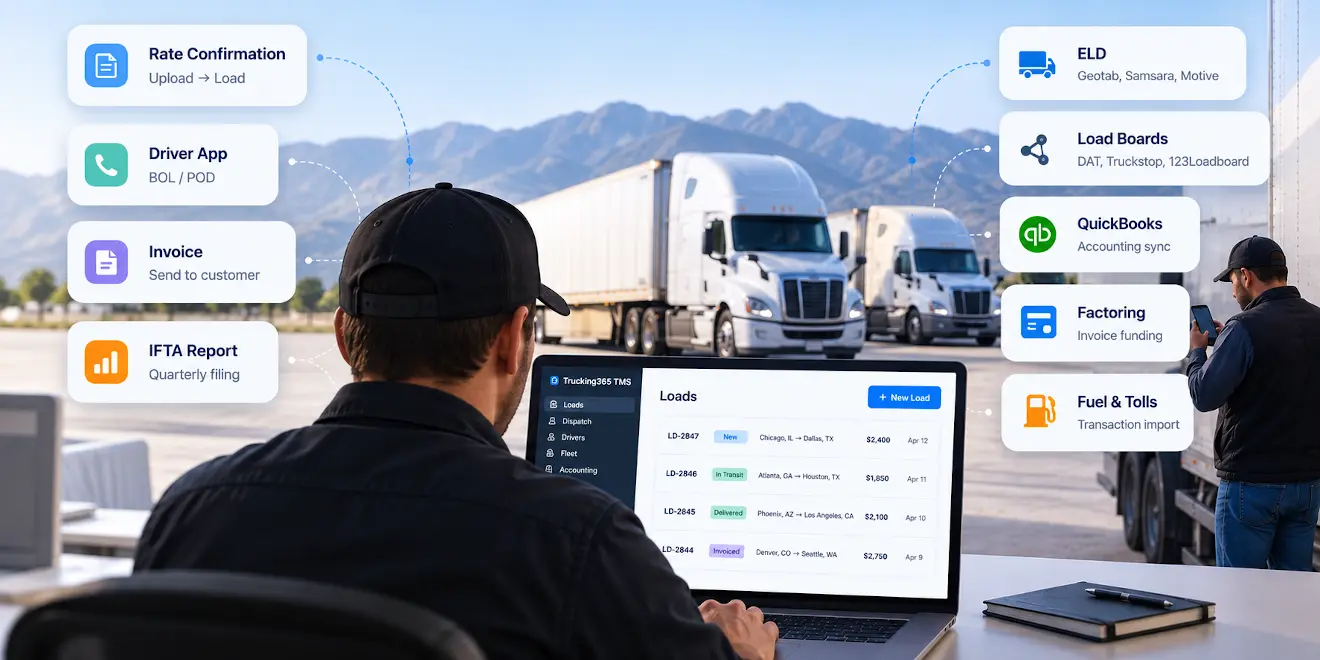
TMS software for carriers is a digital solution designed to manage, automate, and organize a company's daily transportation business processes.
It brings together different parts of carrier operations, including load management, dispatch, driver management, fleet management, document handling, invoicing, settlements, expenses, compliance information, integrations, and reporting.
For carriers, the right TMS software can provide:
- more efficient dispatch and fleet management;
- less repetitive data entry;
- better visibility across trucks, drivers, and loads;
- faster document and invoice processing;
- more consistent driver settlements;
- easier access to compliance and expiration information;
- better financial and operational reporting.
The central idea is simple: information that enters the company once should not have to be manually recreated every time another person or department needs it.
Classification of TMS Software for Carriers
There is no universal industry standard that defines a small, medium, or large carrier by one exact truck count.
For practical purposes, however, TMS requirements change significantly as a carrier adds trucks, drivers, and office employees.
We can roughly divide carrier TMS use into several operating stages.
TMS for owner operators
A single owner operator has a different workflow from a multi-truck carrier because one person may handle driving, dispatch, documents, expenses, and invoicing.
We cover that operating model separately in our guide to TMS for owner operators.
TMS for small carriers with 2–7 trucks
At this size, the company is still relatively compact, but operations are no longer centered on a single person.
There may already be several drivers, a dispatcher, and somebody helping with paperwork or accounting.
The carrier needs more than basic load management.
Driver records, trucks and trailers, documents, expenses, settlements, maintenance information, customer records, and expiration dates start accumulating quickly.
The first major challenge is keeping the information organized while making sure the right people can access it.
TMS for growing carriers with 8–15 trucks
Once a carrier reaches this stage, the problem changes.
The company usually has clearer responsibilities between dispatch, drivers, accounting, safety, and management.
A dispatcher needs one view of the operation. Accounting needs another. The owner needs reporting. Drivers need access to load information without access to internal company data.
This is where users, roles, permissions, mobile communication, reporting, integrations, and consistent workflows become much more important.
TMS for carriers with 16–30 trucks
With 16–30 trucks, manual coordination becomes increasingly expensive.
More loads are moving at the same time. More documents are arriving. More driver pay needs to be calculated. More trucks have inspections, registrations, insurance, and maintenance dates to track.
A TMS at this stage needs to work as shared operational infrastructure rather than simply a dispatch tool.
The system should connect departments, reduce duplicate work, provide management visibility, and integrate with other systems the carrier already uses.
Why TMS requirements change as a carrier grows
Adding one truck does not simply add one more record to a spreadsheet.
It adds another driver, another schedule, more loads, more BOLs and PODs, more fuel purchases, more maintenance, more invoices, more payroll or settlements, and more compliance information.
The number of relationships between those records grows even faster.
This is why processes that work well for two trucks can become difficult at eight trucks.
For example, a dispatcher may know from memory which driver is available when the company has two or three trucks.
With ten trucks, that information needs to be visible.
A bookkeeper may be able to find a missing POD by calling one driver.
With fifteen drivers, repeatedly chasing documents becomes part of the job.
A company owner may know whether the business had a good week by looking at the bank account when the operation is very small.
As the fleet grows, that is no longer enough. Revenue, expenses, truck workload, driver workload, unpaid invoices, fuel, maintenance, and other indicators need to be visible separately.
This is the point where a carrier TMS becomes less about storing data and more about coordinating the company.
Key Features of TMS Software for Carriers
There is probably one feature that every carrier TMS must have regardless of fleet size: load management. Loads are the operational center of a trucking business. But load management alone is not enough once multiple trucks, drivers, and employees are involved.
Load Management
Any carrier must keep track of the freight it is transporting.
A TMS should allow the carrier to enter complete load information, store the rate, customer, pickup and delivery locations, appointments, equipment, driver, documents, and other relevant information.
The load status should change as transportation progresses.
The system should also make it possible to search historical loads and find the information and documents connected to them.
Manual load creation can itself become a significant amount of work.
Trucking365 TMS can create load information from an uploaded rate confirmation PDF, reducing the amount of information dispatchers have to enter manually.
Dispatch Management
Dispatching directly affects truck utilization and carrier revenue.
A dispatcher needs to know what is happening with every truck without opening each load separately or calling every driver.
A useful dispatch board should show trucks, assigned drivers, loads, equipment, and transportation status in one operational view.
As the company grows, dispatch should also make it easier to see available capacity and identify trucks that may otherwise spend too much time empty or waiting.
The objective is not simply to display loads.
It is to give the dispatcher enough information to make the next operational decision.
Fleet Management
Fleet management becomes more difficult as the number of trucks and trailers grows.
Carrier TMS software should keep vehicle information organized and make important dates visible.
That includes information such as registration, insurance, inspections, maintenance, and other equipment records.
Trucking365 TMS can notify users about upcoming vehicle document expiration dates so those dates do not have to be maintained in a separate spreadsheet or calendar.
Driver Management
The same problem applies to drivers.
A carrier needs a current driver record that can include contact information, employment or contractor information, CDL information, medical card dates, pay settings, documents, and current status.
For a fleet manager or safety employee, driver information should be easy to find without going through dispatch notes or separate folders.
For dispatch, the same driver record needs to connect to assignments and trips.
For accounting, it may also determine how a settlement is calculated.
The value comes from using the same driver information across the company instead of maintaining separate versions of it.
Driver Mobile App and Electronic Documents
The driver is part of the TMS workflow even when the driver never opens the web-based back office.
A Driver App connects the road with the office.
The Trucking365 TMS Driver App allows drivers to receive load notifications, view load information, upload BOLs, PODs, and other documents, update load progress, communicate with dispatch, and access settlement information from a mobile device.
This changes the document workflow significantly.
A POD that remains on a driver's phone is still waiting to be processed.
A POD uploaded to the load can immediately become available to the people responsible for invoicing.
For a carrier with multiple drivers, removing this delay from every delivered load can save a considerable amount of back-office work.
Expense Management
With multiple trucks and drivers on the road, carriers process a large number of expenses.
Fuel, maintenance, repairs, tolls, parking, insurance, equipment payments, scales, lumper charges, and other expenses all need to be recorded correctly.
The important part is not only storing the amount.
Expenses should be connected to the correct truck, driver, date, category, or other business context when applicable.
This makes the information much more useful later when the company analyzes costs.
Invoice Management and Accounts Receivable
The invoice management feature in carrier TMS software is important because delivery does not generate cash until the load is billed and paid.
A TMS already knows most of the information needed for an invoice:
the customer, load, rate, reference numbers, additions or deductions, and supporting documents.
That information should be reused instead of entered again into a separate document.
The system should also make it possible to identify open, paid, and overdue invoices.
For carriers processing dozens or hundreds of loads, this visibility is much more important than simply being able to generate a PDF invoice.
Driver Settlements
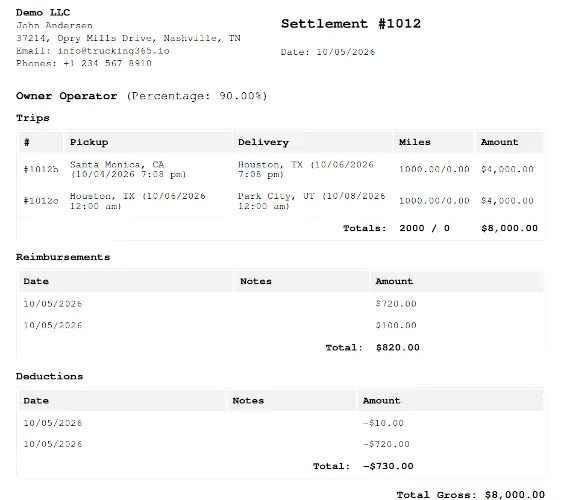
Driver settlements are another workflow that becomes increasingly difficult to manage manually.
Different carriers pay drivers differently.
A company driver may be paid by mile. Another may be paid a percentage. An owner operator may receive a percentage of gross after company fees and deductions. Teams may require another calculation.
There may also be detention, layover, stop pay, reimbursements, deductions, bonuses, or other adjustments.
Carrier TMS software should calculate those rules using information already stored in the system and produce a settlement that both the company and driver can understand.
Trucking365 TMS supports driver settlements and different driver payment structures so the accounting team does not have to rebuild the calculation for every pay period.
Customer Management
As a carrier completes more loads for different brokers and shippers, customer information becomes increasingly valuable.
A customer record can contain contacts, locations, documents, notes, billing information, and the history of loads and invoices associated with that company.
Trucking365 TMS also allows carriers to maintain internal customer ratings based on their own experience.
That information can help dispatch and management make better decisions when working with the same customer again.
Users, Roles, and Permissions
Users and roles matter much more to a multi-truck carrier than to a one-person operation.
A dispatcher should have the tools needed to dispatch loads.
Accounting needs access to invoices, expenses, and settlements.
A safety employee needs driver and vehicle information.
The company owner or administrator may require complete access.
Those employees should not all have to share one login, and they should not necessarily have access to the same actions.
Trucking365 TMS allows companies to create users and roles and control permissions based on responsibilities.
As the carrier grows, this becomes an important part of keeping the system usable and company information appropriately separated.
ELD, Telematics, and GPS Integration
An ELD and a TMS solve different problems.
An Electronic Logging Device records driving and duty-status information required under applicable Hours of Service rules.
FMCSA Hours of Service regulations define how long commercial drivers may drive and remain on duty, and the ELD rule applies to most motor carriers and drivers who are required to maintain records of duty status, subject to specific exceptions.
A TMS manages the larger business workflow around the load.
Connecting the two allows supported information to move between systems without manual entry.
Trucking365 TMS supports integrations with ELD and telematics providers including Motive, Samsara, and Geotab.
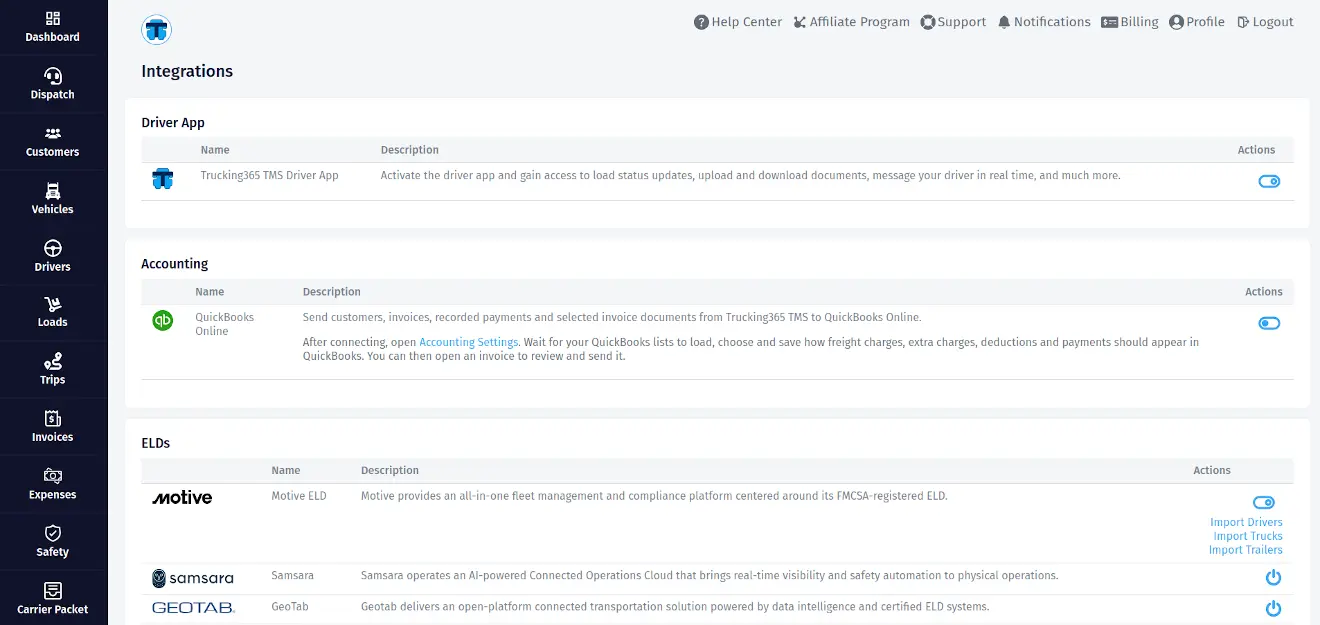
Depending on the provider and supported data, these integrations can provide information such as drivers, vehicles, trailers, locations, or mileage.
For dispatch, location information improves fleet visibility.
For reporting, mileage data can reduce manual work.
For IFTA, jurisdiction mileage from a supported integration can become an important part of the quarterly report preparation process.
Safety, DOT, FMCSA, and HOS Information
A TMS does not make a carrier compliant simply because compliance-related information is stored in the system.
The carrier remains responsible for applicable DOT, FMCSA, HOS, ELD, insurance, licensing, and safety requirements.
What a TMS can do is make the information easier to manage.
Driver CDL and medical-card expiration dates, vehicle inspections, registrations, insurance, maintenance information, and other records can be stored and monitored in one system.
Expiration reminders are especially useful in a growing fleet because the number of dates that somebody has to remember increases with every driver and vehicle.
IFTA Report Generation
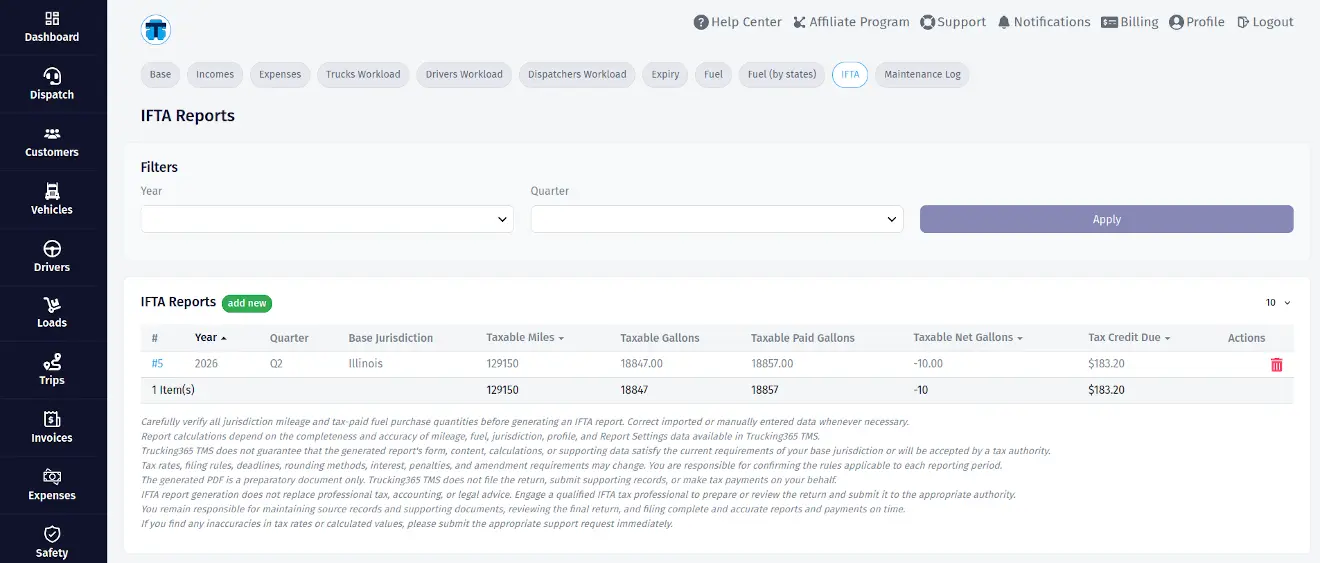
IFTA reporting is another process where information from several parts of the company has to come together.
The carrier needs jurisdiction mileage and tax-paid fuel information for the reporting period.
Collecting that information manually at the end of each quarter can take a significant amount of time.
Trucking365 TMS can prepare an IFTA report using mileage and fuel data recorded or imported into the system.
Supported ELD integrations can import jurisdiction mileage and reduce manual mileage entry.
The carrier should still review the source information before filing. The TMS helps organize and calculate the report data; the carrier remains responsible for the accuracy of the filing.
QuickBooks Online Integration
TMS software and accounting software do not have to compete with each other.
They manage different layers of the business.
The TMS understands trucking operations: loads, drivers, trucks, documents, settlements, customers, and freight invoices.
Accounting software handles the company's broader financial books.
Trucking365 TMS integrates with QuickBooks Online so supported customer, invoice, payment, attachment, and related accounting information can be synchronized between the systems.
The practical benefit is avoiding another round of copying information that already exists in the TMS.
Factoring Integration
Some carriers use factoring to improve cash flow instead of waiting for standard customer payment terms.
The factoring company and the TMS still perform different functions.
The TMS creates and organizes the invoice and supporting freight documents. The factoring company handles financing under its agreement with the carrier.
Trucking365 TMS integrates with Triumph Business Capital for supported factoring workflows.
A carrier can submit an invoice and associated freight documentation through the integration after the required Triumph access has been configured.
Load Boards
Load boards such as DAT and Truckstop are an important part of the carrier technology ecosystem, but a load board and a carrier TMS are not the same thing.
A load board helps the carrier find freight.
A TMS manages the company's operation around freight.
After a dispatcher finds and books the load, the TMS becomes the place where the carrier manages the driver, truck, documents, expenses, delivery, invoice, settlement, and reporting connected to that work.
Some TMS providers offer direct load-board integrations.
When evaluating any carrier TMS, companies that depend heavily on spot-market freight should ask which load boards are currently integrated and exactly what data can be exchanged.
Broker Tracking Links and Customer Visibility
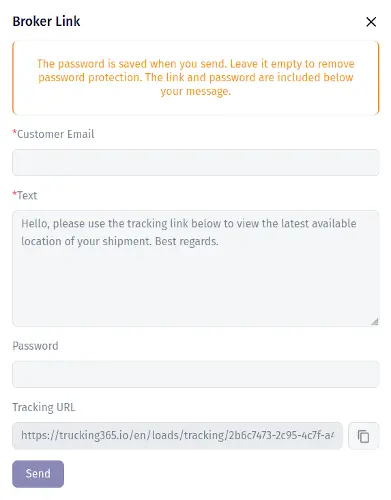
Once a fleet grows, status requests from brokers and customers can become another source of repetitive communication.
Providing shipment visibility without requiring repeated check calls can reduce work for both dispatch and drivers.
Trucking365 TMS supports broker tracking links on applicable plans so shipment visibility can be shared without giving an outside party access to the carrier's TMS account.
Reports in Carrier TMS Software
Carrier TMS software should provide reports that help owners and managers understand what is actually happening inside the business.
A revenue and expense report helps show where the company earns money and where it spends it.
Truck workload reporting can show how equipment is being used.
Driver workload reporting helps management understand how work is distributed.
Fuel and maintenance information can expose operating costs.
Expiry reports make upcoming compliance-related dates easier to review.
For a growing carrier, reporting is not simply a historical feature.
It is how the owner stops managing the company only from memory.
How Trucking365 TMS connects carrier departments
The easiest way to evaluate a carrier TMS is not to count how many menu items it contains. Look at what happens to information when it moves between people.
Dispatch
The dispatcher receives or creates the load, assigns the driver and equipment, monitors progress, and deals with changes during transportation.
In Trucking365 TMS, a rate confirmation PDF can be used to create load information, and dispatchers can manage trucks and active transportation through the dispatch workflow.
The objective is to reduce the time spent entering information before the truck can move.
Drivers
Drivers need the operational information required to complete the trip.
They do not need the accounting department's entire view of the TMS.
The Trucking365 TMS Driver App provides load information, document upload, load progress, messaging, tracking, and settlement access through the driver's mobile device.
This keeps the driver connected to the same operation without requiring access to the carrier's full back office.
Fleet and Safety
Fleet and safety employees work with trucks, trailers, driver records, documents, and expiration dates.
Because that information is connected to the same drivers and vehicles used by dispatch, another independent list does not have to be maintained.
Supported ELD integrations can also provide vehicle, driver, location, and mileage information.
Accounting and Back Office
Accounting receives the result of the work completed by dispatch and the driver.
The load already contains the customer and rate.
The driver has uploaded the POD.
Expenses can already be assigned.
That information can then be used for invoicing, settlements, reporting, QuickBooks Online synchronization, or supported factoring workflows.
The less information accounting has to recreate, the faster a delivered load can become a completed financial transaction.
Management
The owner or manager needs a different level of visibility.
Instead of following each document individually, management needs to understand revenue, expenses, workload, outstanding invoices, driver activity, fleet status, and other operational indicators.
This is why reporting and user permissions become more important as the carrier grows.
What carrier feedback has taught us
We learn a significant amount about TMS design from support requests and feature requests submitted by Trucking365 TMS customers.
Most carriers do not ask for automation in abstract terms.
They ask us to remove a particular repetitive step or make the system reflect how their business actually operates.
Driver settlements are a good example.
One carrier working with owner operators paid as a percentage of gross needed its settlements to clearly separate the full trip gross, company fees, deductions, and net payable while still showing the miles for each load.
The calculation itself was not the whole problem.
The settlement had to present the numbers in the same way the carrier and driver understood their agreement.
We changed the settlement workflow accordingly.
We see the same pattern with integrations.
Carriers ask about ELD connections because they do not want to maintain vehicle location or mileage twice.
They ask about QuickBooks Online because they do not want to recreate invoices in accounting software.
They ask about factoring because the invoice and supporting documents already exist in the TMS.
They ask about IFTA because reconstructing jurisdiction mileage at the end of a quarter is unnecessary work if the data has already been collected.
These requests have influenced the direction of Trucking365 TMS.
They also reinforce something we learned early: the value of a carrier TMS is not the number of features printed on a feature page.
It is how many unnecessary handoffs, copies, calculations, searches, and reminders it removes from the carrier's normal day.
Ease of use appears regularly in the feedback we receive. That matters more as a fleet grows.
A feature only saves time if dispatchers, drivers, accounting staff, and managers are actually willing and able to use it.
What a carrier TMS should integrate with - and what it should not try to replace
A modern trucking company may use several specialized systems.
Trying to make one product replace every one of them usually creates another complicated system.
A better approach is to keep the operational record in the TMS and connect specialized services when appropriate.
An ELD records driving and HOS-related data.
A load board helps find freight.
QuickBooks manages accounting.
A factoring company provides financing.
Fuel and toll providers manage their specialized transactions.
The TMS should connect these activities to the carrier's loads, drivers, vehicles, customers, invoices, expenses, and reports.
This distinction is important when evaluating integrations.
Do not only ask a TMS vendor whether an integration exists.
Ask what data moves between the systems, in which direction, how frequently it updates, and what work the integration actually removes.
How to choose TMS software for a carrier
Choosing carrier TMS software should begin with the work the company is already doing.
Do not begin with the longest feature list. Start by identifying where information is duplicated, where employees wait for somebody else, where documents get lost, and which processes still depend on one person remembering what to do next.
Then evaluate the TMS against those workflows.
| Question | Why it matters |
|---|---|
| How quickly can dispatch create a load? | Manual load entry is repeated on every load |
| Can drivers receive loads and upload BOL/POD documents from the road? | Driver-to-office document delay slows billing |
| Can we manage company drivers and owner operators with our actual pay rules? | Generic settlement logic creates manual corrections |
| Can different employees have different permissions? | Multi-user carriers need role separation |
| Which ELD and telematics providers are supported? | Prevents duplicate fleet and mileage entry |
| Can invoices and payments sync with our accounting system? | Reduces accounting double entry |
| Does the system support our factoring workflow? | Can shorten invoice submission workflow |
| How does it handle IFTA? | Quarterly reporting can otherwise require manual reconstruction |
| Can we export and access our business information? | Carrier data should not become trapped in the system |
| How quickly can the company onboard? | A TMS that takes months to adopt delays its value |
| Is support responsive when something does not fit our workflow? | Carrier operations cannot stop while waiting for software answers |
| Can the system still work when we add more trucks and employees? | Replacing the transportation management system during growth is expensive |
The best system is not necessarily the one with the most functions. It is the one that fits enough of the company's real workflow to eliminate more work than it creates.
Best Carrier TMS Software
A good carrier TMS should provide the core capabilities described above. But the best TMS for one carrier may not be the best TMS for another.
A five-truck carrier may value simple dispatch, documents, settlements, invoicing, and support.
A fifteen-truck fleet may care more about users and permissions, reporting, mobile driver workflows, broker visibility, and integrations.
A thirty-truck carrier may need more advanced reporting, custom integrations, structured onboarding, and tighter control across several departments.
This is why we designed Trucking365 TMS pricing around fleet growth rather than forcing every carrier into the same package.
For small fleets with 2–7 trucks, the Startup plan is $79 per month and supports up to five users.
For fleets with 8–15 trucks, the Growing plan is $149 per month with unlimited users.
For carriers with 16–30 trucks, the Pro plan is $249 per month with unlimited users and additional premium capabilities.
Larger fleets can use an Enterprise plan with custom pricing, integrations, and onboarding.
Regardless of carrier size, the underlying goal remains the same: keep load, dispatch, driver, fleet, document, financial, and reporting information connected so that growth does not automatically mean more administrative work.
A carrier TMS should make growth easier to manage
When a carrier grows, the problem is not simply that there are more loads.
There are more people, more handoffs, more documents, more payments, more equipment, and more decisions happening at the same time.
A good TMS gives all of those activities a common operational record.
Dispatch should not have one version of a load while accounting has another.
The POD should not have to travel through several messages before it reaches invoicing.
Mileage that already exists in an ELD should not be typed into another system simply because quarter-end has arrived.
Driver pay should not be recalculated manually because the TMS cannot represent the company's pay rules.
This is the kind of work Trucking365 TMS is designed to reduce.
The goal is not to put more software into the trucking company.
It is to make the company easier to operate as more trucks, drivers, customers, and employees are added.
Frequently Asked Questions
What is carrier TMS software?
Carrier TMS software is a transportation management system designed around the operations of a trucking carrier.
It typically manages loads, dispatch, drivers, trucks and trailers, documents, expenses, invoicing, settlements, compliance information, integrations, and reporting.
How is a carrier TMS different from a broker TMS?
A carrier TMS is centered on operating trucks and drivers.
A broker TMS is centered on sourcing external carrier capacity and managing freight moved by third-party carriers.
Some platforms support both operations, but the workflows and data requirements are different.
Does a small carrier with 2–7 trucks need a TMS?
A small carrier can operate without a TMS, but the benefits usually increase as more drivers, trucks, documents, invoices, and employees become involved.
The practical question is whether the company is already entering the same information in several places or depending on manual communication to keep operations synchronized.
Does carrier TMS software replace an ELD?
No.
An ELD is used to record driving and duty-status information under applicable Hours of Service requirements.
Carrier TMS software manages the wider operational and business workflow.
The systems can be integrated so supported ELD information can be reused in the TMS.
Can a carrier TMS help with FMCSA and DOT compliance?
A TMS can help organize driver and vehicle records, document expiration dates, maintenance information, and other compliance-related data.
It does not transfer regulatory responsibility from the carrier to the software provider.
The carrier remains responsible for complying with applicable FMCSA, DOT, HOS, ELD, safety, insurance, and other requirements.
Can carrier TMS software create IFTA reports?
Yes, some carrier TMS platforms can use mileage and tax-paid fuel information to prepare IFTA reports.
Trucking365 TMS supports IFTA reporting and can use supported jurisdiction-mileage data imported through ELD integrations to reduce manual entry.
Does Trucking365 TMS integrate with QuickBooks?
Trucking365 TMS supports QuickBooks Online integration for supported synchronization of customers, invoices, payments, attachments, and related accounting information.
Does Trucking365 TMS support factoring?
Trucking365 TMS supports a factoring workflow with Triumph Business Capital.
After the required Triumph access is configured, supported invoices and related freight documentation can be submitted through the integration.
Does Trucking365 TMS have a Driver App?
Yes.
The Trucking365 TMS Driver App allows drivers to receive load information, upload BOLs and PODs, update load progress, communicate with dispatch, share tracking information, and access settlement information from a mobile device.
What ELD providers integrate with Trucking365 TMS?
Trucking365 TMS supports integrations with providers including Motive, Samsara, and Geotab.
Supported information depends on the individual integration and can include drivers, trucks, trailers, vehicle locations, mileage, and other fleet or reporting data.
How much does Trucking365 TMS cost for carriers?
The Startup plan for 2–7 trucks costs $79 per month.
The Growing plan for 8–15 trucks costs $149 per month.
The Pro plan for 16–30 trucks costs $249 per month.
Enterprise pricing is available for fleets with more than 30 trucks.
A free trial is available without a credit card.