
A good TMS for owner operators keeps loads, rate confirmations, BOLs and PODs, expenses, invoices, payments, vehicle information, and reporting connected in one place. For an owner operator running a single truck, this is especially important because the driver, dispatcher, bookkeeper, and business owner are often the same person.
For an owner operator, a TMS should do more than keep a list of loads. It should reduce the amount of administrative work that has to be done before, during, and after every trip.
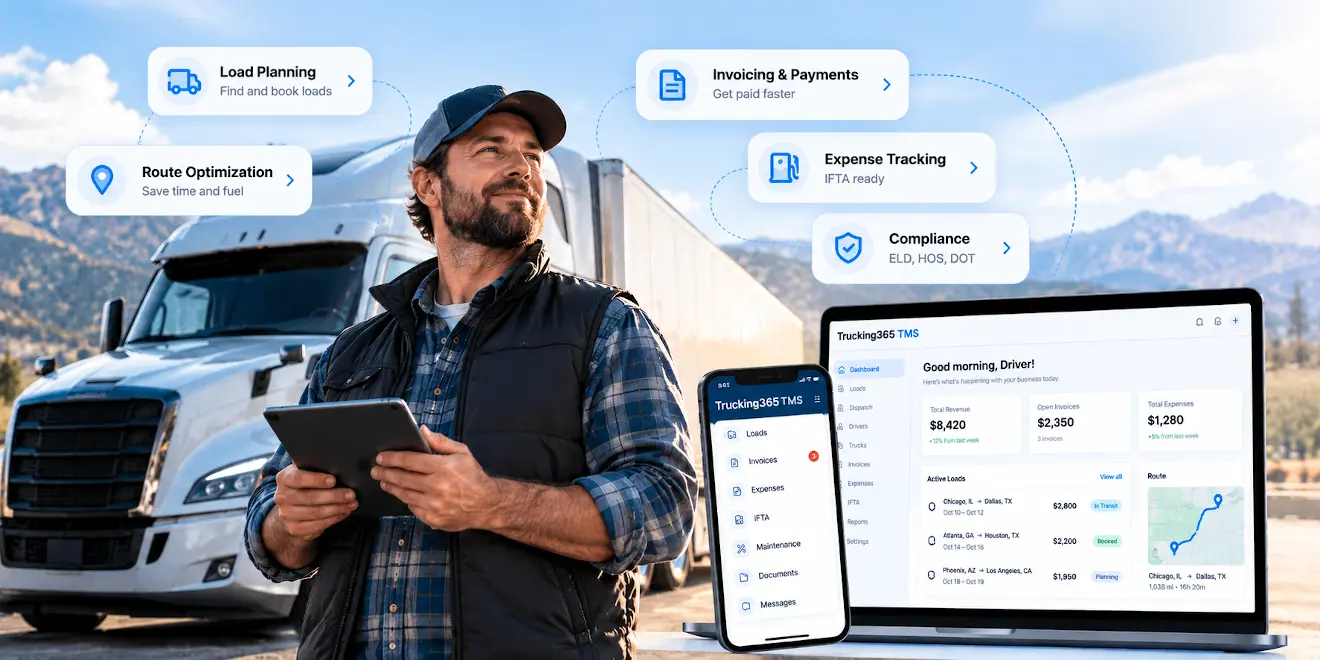
What is TMS and how do owner operators use it?
Firstly, let's define what a TMS is.
A Transportation Management System (TMS) is a comprehensive set of software tools used to manage trucking operations. TMS gives owner operators the ability to streamline their processes, reduce repetitive work, improve visibility, and keep the operational side of the business organized.
Owner operators use TMS to manage their trucking operations in a variety of ways. A TMS can help manage loads and dispatch, store rate confirmations and freight documents, track expenses, create invoices, monitor payments, maintain vehicle information, and prepare reports.
This is different from using several separate tools for the same load.
A rate confirmation may arrive by email. The load information may be written into a spreadsheet. BOL and POD photos may stay on the driver's phone. Fuel receipts may be stored somewhere else. The invoice may then have to be created manually after delivery.
A TMS connects these steps around the same load.
For an owner operator, the purpose of the system is not to add more software to the business. It is to reduce the amount of work needed to keep the business running.
What are the main features of TMS for owner operators?
TMS is designed to help owner operators organize and manage their trucking operations. The exact feature set varies between platforms, but several functions are particularly useful for a one-truck or small carrier operation.
Load management and dispatch
Load management is the core of a carrier TMS.
The system should keep the customer, rate, pickup and delivery locations, appointment times, equipment, driver, truck, load status, and related documents together.
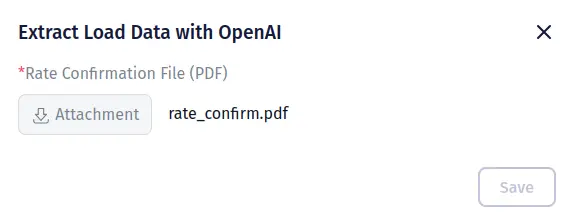
Trucking365 TMS can use an uploaded rate confirmation PDF to create the load information with AI, reducing the amount of data that has to be entered manually.
For an owner operator, load entry should also be fast. Spending several minutes copying information from a rate confirmation into different fields is still manual work, even if the information ends up in a TMS.
Route and trip information
TMS software can help keep the operational information required for a trip in one place, including pickup and delivery locations, stops, appointments, truck and trailer information, and load status.
Some transportation management systems also provide routing tools or integrate with specialized routing services.
A TMS should not be confused with a truck navigation system. The purpose of TMS is to manage the transportation operation around the trip, while specialized navigation software handles turn-by-turn truck routing.
Vehicle and maintenance management
Owner operators still need fleet management even when the fleet contains only one truck.
A TMS can store truck and trailer information, maintenance records, registration details, inspections, and expiration dates.
This becomes more important as soon as another truck or trailer is added to the business, because remembering every renewal and maintenance date becomes much harder.
Expense tracking
Knowing the gross amount of a load is not enough to know whether the load was profitable.
Fuel, tolls, repairs, maintenance, lumper fees, scales, factoring fees, insurance, and other expenses all affect what an owner operator actually earns.
A TMS gives the owner operator one place to record operational expenses and later use that information in reports and business analysis.
Invoice generation and payment tracking
After a load has been delivered, the next operational task is getting paid.
Instead of entering the same customer, load, rate, and delivery information again in separate invoicing software, a TMS can generate an invoice using information that already exists in the load.
The system should also make it easy to see which invoices have been paid and which are still outstanding.
Document management
Rate confirmations, BOLs, PODs, receipts, scale tickets, lumper receipts, insurance documents, and other files can quickly become difficult to manage when they are spread across email, a phone, cloud storage, and paper folders.
A good TMS keeps the documents connected to the load, vehicle, driver, customer, or invoice they belong to.
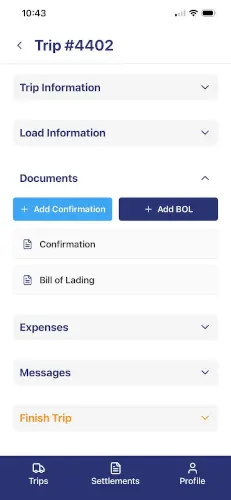
With the Trucking365 TMS Driver App, load documents such as BOLs and PODs can be uploaded from a mobile device instead of waiting until somebody gets back to a computer.
IFTA reporting
IFTA - the International Fuel Tax Agreement - is another reason why organized mileage and fuel records matter to owner operators who operate in multiple jurisdictions.
Preparing an IFTA report manually means collecting mileage by jurisdiction and matching it with tax-paid fuel purchases for the reporting period.
Trucking365 TMS includes an IFTA reporting workflow that prepares a quarterly fuel-tax worksheet using jurisdiction mileage and tax-paid fuel purchases. When a supported ELD integration provides mileage by jurisdiction, that data can reduce the amount of mileage information that has to be entered manually.
The source information should still be reviewed before filing. A TMS helps prepare and organize the data. Responsibility for filing an accurate IFTA return remains with the carrier.
ELD and HOS data
A TMS and an Electronic Logging Device are not the same thing.
An ELD records driving time and records of duty status used for Hours of Service compliance. A TMS manages the larger transportation workflow around loads, documents, billing, expenses, vehicles, and reporting.
For this reason, an owner operator may use both.
When a TMS connects with an ELD or telematics provider, information such as vehicle location or mileage can be reused instead of entered again manually. Trucking365 TMS supports integrations with ELD and telematics providers including Motive, Samsara, and Geotab for supported fleet and reporting data.
The TMS does not replace the ELD where an ELD is required.
Compliance and expiration reminders
A TMS can also help keep operational records organized and remind the carrier about upcoming document expiration dates.
For example, Trucking365 TMS can store vehicle information and alert users about upcoming expiration dates for documents such as vehicle inspection, registration, or insurance.
For carriers with drivers, it can also store driver records such as CDL and medical-card information.
Software helps organize the information, but the carrier remains responsible for complying with applicable DOT and FMCSA requirements.
What benefits does TMS provide to owner operators?
One of the main advantages of using a TMS is that it can help streamline operations and reduce repetitive work.
An owner operator does not have a separate department for every part of the business. Time spent creating an invoice, finding a POD, checking whether a customer paid, or rebuilding mileage records for IFTA is time that cannot be spent driving, booking the next load, or managing the business.
Another benefit of using trucking management software is improved visibility and control over transportation operations.
When the load, documents, expenses, invoice, and payment information are connected, it becomes much easier to understand the current state of the business.
A TMS can also improve customer service. Load details and documents can be found faster, invoices can be sent sooner, and questions from brokers or customers can be answered without searching through several applications.
In addition, a TMS can help owner operators organize information related to industry regulations and reporting requirements.
The real advantage is not simply having more features. It is having fewer disconnected steps between booking a load and completing the business side of that load.
Does an owner operator with one truck really need a TMS?
Not every owner operator needs complicated transportation software on the first day of business.
A spreadsheet, email, cloud folder, and accounting application can work when load volume is low and there is little information to manage.
The problem appears when the same information starts being entered several times.
You receive the rate confirmation, enter the load into a spreadsheet, save its documents somewhere else, record fuel separately, create the invoice in another system, check the payment manually, and later reconstruct mileage and fuel information for IFTA.
None of those individual tasks seem difficult. Doing all of them for every load is where the time disappears. That is usually the point where a TMS becomes useful even with one truck.
A one-truck carrier does not need enterprise software designed around dozens of dispatchers. It needs a simple system that keeps the work around each load together and does not create another administrative job.
TMS vs spreadsheet vs ELD vs load board
These tools solve different problems and should not be considered direct substitutes for each other.
| Tool | Main purpose | What it does well | What it normally does not replace |
|---|---|---|---|
| TMS | Manage trucking operations | Loads, dispatch, documents, expenses, invoicing, reporting | ELD hardware, load marketplace |
| Spreadsheet | Store manually entered information | Simple lists and calculations | Workflow automation, document capture, integrations |
| ELD | Record driving time and HOS information | Records of duty status, vehicle/driver data | Invoicing, customer records, complete load lifecycle |
| Load board | Find available freight | Connect carriers with available loads | Managing the load after it is booked |
| Accounting software | General business accounting | Bookkeeping, chart of accounts, financial accounting | Trucking-specific load and dispatch workflow |
A load board such as DAT or Truckstop is primarily a marketplace where carriers find freight. A TMS is what manages the operational process after the load has been booked.
An ELD handles driving and Hours of Service information. The TMS handles the business process around the freight.
Accounting software and a TMS can also work together. Accounting software manages the company books, while the TMS knows the trucking-specific context behind a transaction: the load, customer, truck, documents, miles, and invoice.
This distinction is important when choosing software. An owner operator may need several of these tools, but the same information should not have to be manually copied between them every time.
How an owner operator can use Trucking365 TMS from rate confirmation to payment
The easiest way to understand the role of TMS software is to follow one load.
1. Create the load
After booking freight, the owner operator receives a rate confirmation.
The load can be entered manually in Trucking365 TMS, or the rate confirmation PDF can be uploaded and analyzed by AI to reduce manual data entry.
The load becomes the central record for its customer, rate, locations, dates, equipment, and documents.
2. Manage the trip and load status
Pickup and delivery information remains available with the load instead of being spread between email messages, notes, and spreadsheets.
As the load moves through its lifecycle, its status and related information can be updated in the system.
3. Keep BOL and POD with the load
Documents collected on the road can be added to the load.
With the Trucking365 TMS Driver App, drivers can receive load information and upload BOLs, PODs, and other load documents from their phones.
That means the paperwork needed for billing does not have to wait in the truck until the end of the week.
4. Record expenses
Fuel and other load or business expenses can be recorded while the information is still easy to identify.
Instead of having revenue in one application and operational expenses somewhere else, the carrier builds a more complete history of the business inside the TMS.
5. Generate the invoice
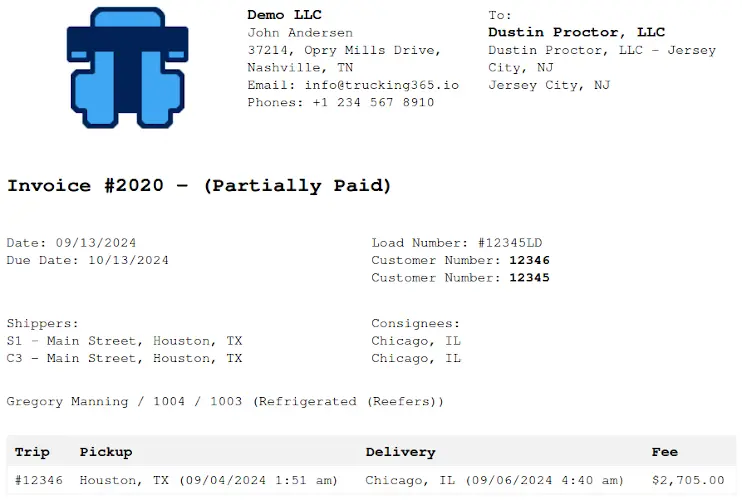
Once the load has been delivered and the required documents are available, the information that was already entered for the load can be used for billing.
This removes another round of typing the same customer, load, and rate information.
The invoice can then be tracked until payment.
6. Use factoring when needed
Factoring is separate from TMS software.
A factoring company advances payment on eligible freight invoices according to the agreement between the carrier and the factor. The TMS can make the process easier by keeping the invoice and supporting freight documents together.
For Trucking365 TMS customers using Triumph Business Capital, Trucking365 TMS has an integration that can submit an invoice and the associated freight documentation through the supported Triumph workflow.
The factoring relationship, approval, funding terms, reserves, recourse, and collections remain between the carrier and the factoring company.
7. Prepare reports and IFTA information
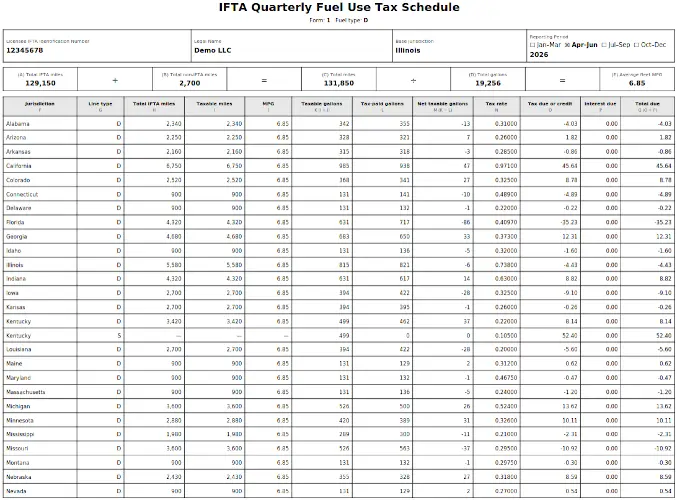
The information accumulated during normal operations can later be reused for reporting.
For IFTA, Trucking365 TMS can prepare the quarterly worksheet from jurisdiction mileage and tax-paid fuel information. Supported ELD integrations can reduce the amount of mileage data that must be entered manually.
The important difference is that quarter-end reporting begins with information that was collected during the quarter, instead of rebuilding three months of operations from receipts and notes.
How Trucking365 TMS fits a one-truck operation
We designed Trucking365 TMS to work not only for fleets with dispatch departments, but also for owner operators and small carriers.
The current Owner plan is designed for a solo owner operator running one truck and one user.
It costs $39 per month.
An owner operator can start with the core TMS workflow and move to a larger plan if the business grows. There is no reason to migrate every load, customer, truck, and document to another system simply because a second truck was added.
Trucking365 TMS is cloud-based, so the main TMS works through a web browser without installing desktop software.
There is also a Driver App for the work that happens away from the office.
This distinction matters for owner operators. The administrative side of the business may be managed on a laptop, but much of the information originates in the truck.
Why mobile access matters more for owner operators
A fleet may have somebody in the office waiting for documents. An owner operator usually does not. The person delivering the load may also be the person responsible for making sure that load gets invoiced and paid.
However, from what we see among Trucking365 TMS customers, there is another very common setup. More than half of the owner operators using our TMS work as a husband-and-wife team: the husband drives the truck, while his wife handles dispatching and much of the back-office work.
In this type of operation, mobile access becomes part of the daily workflow rather than simply a convenient extra. The driver needs immediate access to load details, pickup and delivery information, dispatcher messages, and documents while on the road. At the same time, the person handling dispatch and back-office work needs those documents to appear in the TMS as soon as possible.
A POD sitting on the driver's phone or somewhere inside the truck is not ready for billing. A POD uploaded from the road and attached to the delivered load can immediately become part of the invoicing workflow.
The Trucking365 TMS Driver App allows drivers to receive load notifications, view load information, upload BOLs, PODs, and other documents, update load progress, communicate with dispatch, and access settlement information from a mobile device.
For a larger carrier, this improves communication between drivers and the office.
For many of the owner operators we work with, it connects two people running the same trucking business from two different places: one behind the wheel and one handling dispatch, paperwork, invoicing, and other back-office tasks.
That is why mobile access matters so much for a one-truck operation. It reduces the number of calls, messages, photos, and documents that have to be manually passed back and forth before a load can be closed and billed.
What we learned from running a small carrier
My experience with small trucking companies started long before Trucking365 TMS existed.
In 2004, I became an owner operator with one truck and one trailer. At that time, there was nothing for a small carrier that looked like the cloud-based TMS platforms we use today. Most of the work was handled through phone calls, email, paper documents, spreadsheets, and whatever software happened to be available for a specific task.
By the time I left the trucking business in 2007, the company had grown to three trucks and four trailers.
That experience gave me an understanding of trucking operations from the carrier's side, but Trucking365 TMS came much later.
From 2010 to 2022, I worked professionally in web development. During that time, my team and I built web platforms and services of different levels of complexity, including systems for companies in logistics and transportation.
Eventually, those two parts of my experience - trucking operations and software development - came together.
A friend of mine had started her own trucking company as an owner operator together with her uncle. We talked regularly about how the business was running, and I started noticing the same operational problems appearing again and again.
Loads were being tracked in spreadsheets. Documents were scattered between email, phones, folders, and different applications. Some invoices were easy to overlook. Expiration dates for important documents had to be remembered or tracked manually.
The same customer, load, driver, truck, and billing information was often entered more than once - copied from a rate confirmation into a spreadsheet, then into another system, then again when creating an invoice or preparing other paperwork.
With one truck, those problems were inconvenient but manageable. As the company grew, they became much harder to control.
By the time the operation reached eight trucks, what had started as several small administrative problems had turned into a large amount of repetitive work, disconnected information, and things that were easy to miss.
That was the point when I decided to help. Instead of adding another spreadsheet or another single-purpose tool, I built the first version of Trucking365 TMS around the actual problems we were seeing in the business.
The goal was straightforward: keep the information about a load connected from the moment it enters the system until the carrier gets paid. That meant connecting loads, customers, drivers, trucks, documents, expenses, invoices, payments, and important expiration dates instead of forcing people to move the same information between different places.
This history still influences how we build Trucking365 TMS today.
For a small carrier, software that creates more administrative work than it removes is not useful.
An owner operator does not need enterprise complexity simply because enterprise TMS platforms have hundreds of features. A small trucking business needs the shortest practical path through the work that happens every day:
load -> documents -> delivery -> invoice -> payment -> reporting.
As the business grows, the system should help prevent the small operational problems that are manageable with one truck from becoming much larger problems with five, eight, or twenty trucks.
That is the problem Trucking365 TMS was originally created to solve.
What should an owner operator look for when choosing a TMS?
There is no single TMS that is automatically the best choice for every trucking business.
Before choosing one, look at the work you currently do manually.
How do you enter loads?
Where do you keep rate confirmations, BOLs, and PODs?
How long does it take between delivery and sending an invoice?
How do you know which invoices are still unpaid?
Where do you record fuel and other expenses?
How do you prepare IFTA mileage?
Does your TMS work with the ELD, accounting system, factoring company, or other tools you already use?
Can you access the information you need while on the road?
And what happens when you add another truck?
For most owner operators, the following capabilities are more important than a long enterprise feature list:
- simple load and dispatch management;
- fast invoicing after delivery;
- BOL and POD storage;
- expense management;
- IFTA reporting;
- ELD or telematics integrations where needed;
- mobile access;
- vehicle and document expiration tracking;
- factoring or accounting integrations when they are part of the business;
- clear pricing for one truck;
- access to your own business data;
- responsive customer support;
- the ability to grow without changing systems.
The best TMS for an owner operator is the one that removes work from the day instead of adding another system that has to be managed.
Frequently Asked Questions
What is a TMS for owner operators?
A TMS for owner operators is transportation management software designed to organize the operational side of a small trucking business. It can manage loads, dispatch information, freight documents, invoices, expenses, vehicles, reporting, and other processes from one system.
Does an owner operator with one truck need a TMS?
Not necessarily on the first load.
A spreadsheet and a few separate applications may be enough at very low volume. A TMS becomes useful when the owner operator starts entering the same information in several places, delaying invoices, losing time managing documents, or reconstructing data for reports such as IFTA.
The decision should be based on how much administrative work the system eliminates, not simply on the number of trucks.
What is the difference between a TMS and an ELD?
An ELD primarily records driving time and records of duty status for Hours of Service requirements.
A TMS manages the transportation business workflow, including loads, dispatch, documents, invoicing, expenses, vehicles, and reporting.
They solve different problems and can be integrated so supported ELD data is reused by the TMS.
Does a TMS replace an ELD?
No.
Using TMS software does not eliminate an ELD requirement when an ELD is required by applicable regulations.
The systems can work together, but they have different purposes.
What is the difference between a TMS and a load board?
A load board is a marketplace where carriers can search for available freight.
A TMS manages what happens around the load once it has been booked: storing load information, managing dispatch, collecting documents, recording expenses, invoicing, and reporting.
Owner operators commonly use both.
Can a TMS help with IFTA?
Yes.
A TMS can organize mileage by jurisdiction and tax-paid fuel purchases and use that information to prepare an IFTA report or worksheet.
Trucking365 TMS can also import supported mileage data from connected ELD providers such as Motive and Samsara to reduce manual mileage entry.
The carrier should always review the source data and remains responsible for the accuracy of its IFTA filing.
Can a TMS help with DOT and FMCSA compliance?
A TMS can help organize records, vehicle and driver information, maintenance information, and document expiration dates.
It does not replace the carrier's responsibility for complying with DOT, FMCSA, Hours of Service, ELD, insurance, safety, or other regulatory requirements.
How does factoring work with a TMS?
Factoring and TMS software are different services.
The TMS manages the invoice and freight documents. A factoring company provides financing according to a separate agreement with the carrier.
When the systems are integrated, the TMS can reduce the manual work required to send the invoice and supporting documents to the factor.
Trucking365 TMS supports a factoring workflow with Triumph Business Capital.
How much does Trucking365 TMS cost for an owner operator?
The Trucking365 TMS Owner plan currently costs $39 per month and is designed for one truck and one user.
There is no credit card required to start the free trial, and there is no long-term contract.
As the operation grows, Trucking365 TMS has plans for larger fleets.
Can Trucking365 TMS grow with an owner operator who adds more trucks?
Yes.
The Owner plan is intended for a single truck. Trucking365 TMS also has plans for fleets with 2–7, 8–15, 16–30, and more than 30 trucks.
This allows the carrier to keep its existing operational data and move to a larger plan instead of changing transportation management systems when the business grows.
Is Trucking365 TMS the best TMS for owner operators?
The answer depends on what you need your software to do.
If you only want a place to write down loads, a spreadsheet may still be enough.
If you need a marketplace to find freight, you need a load board.
If you need Hours of Service records, you need an ELD.
But if the problem is keeping your loads, documents, expenses, invoices, vehicles, payments, and reporting organized without running the business across several disconnected tools, that is the problem a TMS is designed to solve.
Trucking365 TMS was built around this workflow.
For a single owner operator, you can start with one truck. If the business grows, the same system can grow with it.
The goal is simple: spend less time managing information about the load and more time running the trucking business.